
Download iSumsoft Windows Password Refixer – Secure Password Recovery Tool for Windows & Server
Struggling to access your Windows PC after forgetting your password? iSumsoft Windows Password Refixer is a trusted software solution designed to help users regain access to their locked-out systems. Whether you're using Windows XP, Vista, 7, 8, 8.1, or even Windows Server 2000, 2003, 2008, or 2012, this tool offers a secure and efficient way to reset your password without data loss.
Unlike risky third-party hacks, iSumsoft uses a legitimate recovery method by creating a new administrator profile, allowing you to log in and regain control. It’s ideal for home users, small business owners, and IT professionals who need a quick fix without compromising system integrity. With a straightforward installation process and support for multiple Windows versions, this tool is a must-have in your digital recovery toolkit.
Download iSumsoft Windows Password Refixer today and take back control of your computer—secure, fast, and reliable.
Key Features of iSumsoft Windows Password Refixer
One of the standout reasons why iSumsoft Windows Password Refixer stands out in the crowded field of password recovery tools is its comprehensive set of features built with user safety and system integrity in mind. First and foremost, it supports a wide range of Windows operating systems, including legacy versions like Windows XP, Vista, and 7, as well as modern systems such as Windows 8, 8.1, and Windows 10/11 (with some limitations). For enterprise users, it extends support to Windows Server editions from 2000 to 2012, making it a versatile solution for both personal and professional environments.
The tool operates through a bootable USB or CD/DVD, meaning it runs independently of the locked Windows system. This ensures that no changes are made to your original system files during the recovery process. Instead, iSumsoft creates a new administrator profile with a blank password, allowing you to log in immediately. This method is both safe and ethical—unlike unauthorized hacking tools that exploit vulnerabilities, iSumsoft follows a legitimate recovery path approved by system standards.
Another notable feature is its user-friendly interface. Even if you're not tech-savvy, the step-by-step wizard guides you through the entire process: downloading the tool, creating a bootable drive, booting from it, and resetting your password. The software also provides clear on-screen instructions and supports multiple languages, enhancing accessibility.
Additionally, it preserves your existing data and files—your documents, photos, and applications remain untouched. The only thing that changes is the login credentials, ensuring a clean and secure recovery experience. Whether you're a home user locked out of your laptop or an IT admin managing a server, iSumsoft delivers a reliable, hassle-free solution.
How to Install and Use iSumsoft Windows Password Refixer
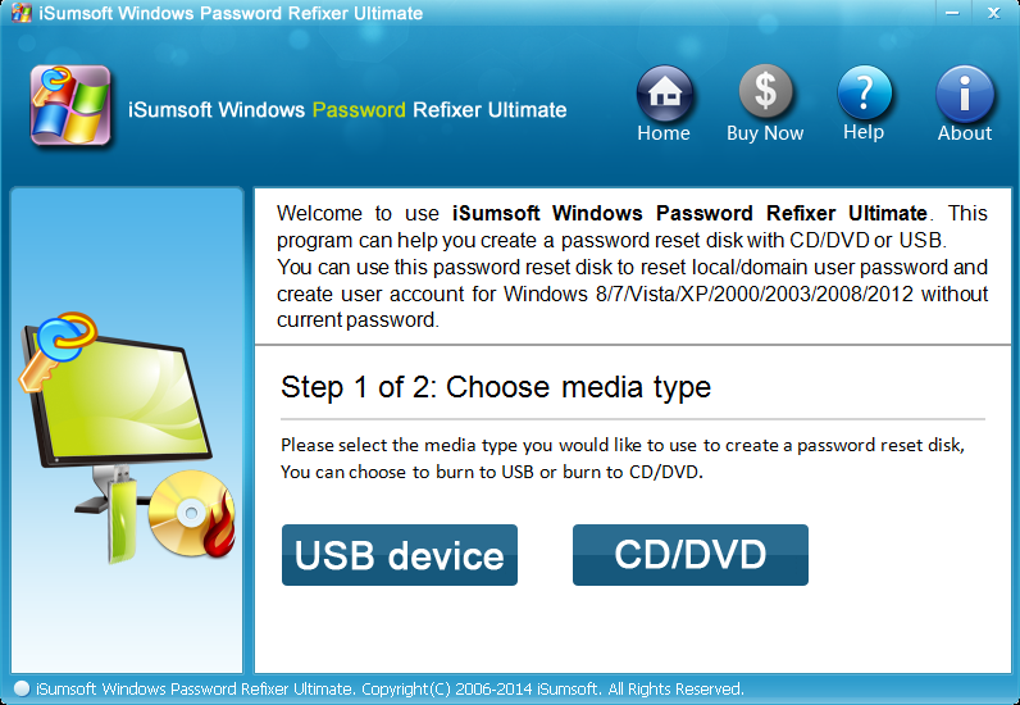
Using iSumsoft Windows Password Refixer is straightforward, even for beginners. The process begins by downloading the software from the official website using another working computer. The download is free, and the file is typically small (under 500 MB), making it easy to transfer via USB or CD. Once downloaded, run the installer and follow the prompts to create a bootable USB drive. The tool automatically formats the USB and copies all necessary recovery files, ensuring compatibility with your target system.
After creating the bootable drive, shut down the locked computer and insert the USB into a USB port. Power on the machine and enter the BIOS/UEFI settings—usually by pressing F2, F12, or Del during startup. From there, change the boot order to prioritize the USB drive. Save the changes and exit. The computer will now boot from the USB, launching the iSumsoft recovery environment.
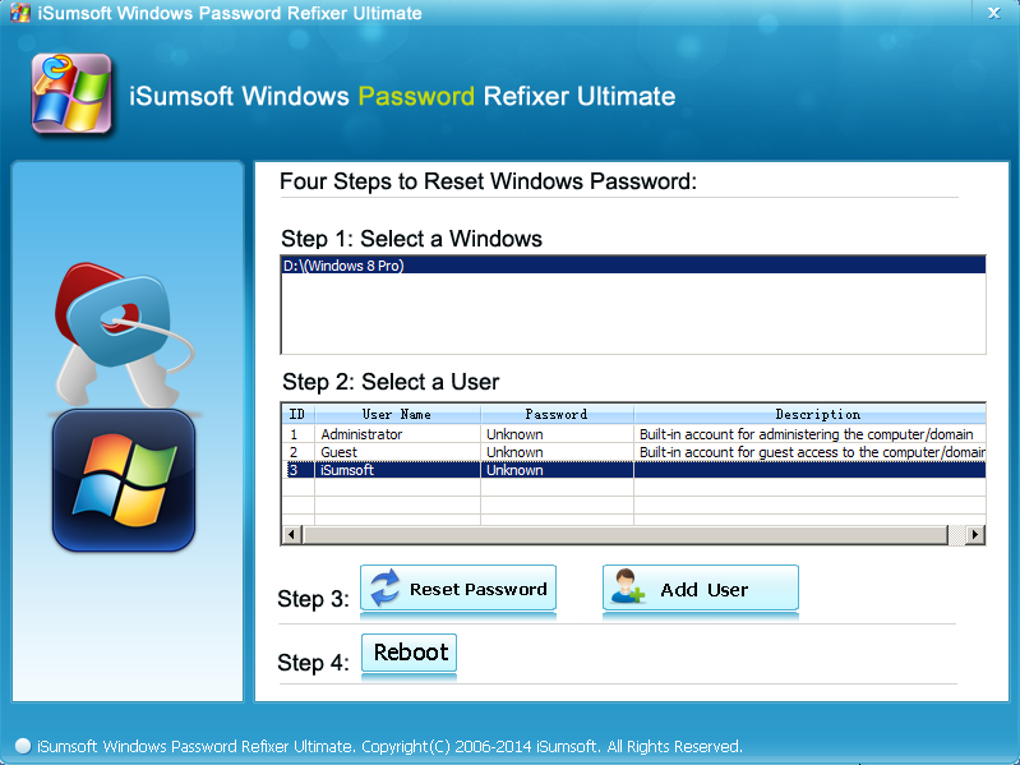
Once the tool loads, you’ll see a simple interface listing all available Windows installations on the system. Select the account you want to reset, then click the “Reset Password” button. The software will instantly clear the password for that account, allowing you to log in without entering a password.
You can then create a new password if desired. After logging in, you’ll have full access to your system, files, and settings. The entire process takes less than 10 minutes and requires no technical expertise.
It’s important to note that while the tool resets the password, it does not recover deleted or encrypted data. However, for most users, regaining access is the primary goal—and iSumsoft delivers on that promise.
Compatibility and System Requirements
When choosing a password recovery tool, compatibility is crucial. iSumsoft Windows Password Refixer supports a broad spectrum of Windows operating systems, making it one of the most versatile tools available. It works seamlessly with Windows XP, Windows Vista, Windows 7, Windows 8, Windows 8.1, and Windows 10/11 (with some restrictions on newer versions). For server environments, it supports Windows Server 2000, 2003, 2008, and 2012—ideal for small business networks and IT administrators managing multiple machines.
To use the software, you’ll need a working computer with internet access to download the tool and create a bootable USB drive. The USB drive must be at least 4 GB in size and formatted as FAT32. The target computer must support booting from USB or CD/DVD, which most modern systems do. No additional software or drivers are required during the recovery process, as the tool runs entirely from the bootable media.
While the software is compatible with both 32-bit and 64-bit systems, it’s important to ensure that the target machine’s firmware supports legacy boot modes if using older Windows versions. For newer systems with UEFI Secure Boot enabled, you may need to disable this feature temporarily. However, the tool provides clear instructions for these scenarios. Overall, iSumsoft is designed to work across a wide range of hardware configurations, from desktops and laptops to servers, ensuring broad accessibility for users of all technical levels.
Pros and Cons of iSumsoft Windows Password Refixer
- Pros:
- Supports multiple Windows versions including legacy systems (XP to Server 2012)
- Creates a new admin profile without data loss
- Safe and ethical recovery method—no system hacking
- Simple, guided interface suitable for beginners
- Fast recovery process (under 10 minutes)
- Free download and easy USB creation
- Preserves existing files and applications
- Cons:
- Does not recover the original password (only resets it)
- Requires another computer to create the bootable drive
- Not available for Windows 11 or newer versions (as of 2024)
- Advanced users may prefer command-line tools
- Some users report minor delays during boot from USB
Frequently Asked Questions (FAQ)
Can I use iSumsoft Windows Password Refixer on Windows 11?
As of 2024, iSumsoft Windows Password Refixer does not officially support Windows 11. The tool is primarily designed for older systems like Windows 7, 8, 8.1, and Server editions. For newer versions, consider using Microsoft’s built-in password reset options or third-party tools with updated support.
Will my files be deleted after using the tool?
No, your files, documents, and applications remain completely intact. iSumsoft only resets the password and creates a new administrator profile. The original data is preserved, ensuring no loss of important information.
Do I need to pay to use the tool?
The software is free to download and use for creating the bootable drive and resetting passwords. However, some advanced features or extended support may require a paid license. The core password reset function is available at no cost.
Can I reset a password for a Microsoft account?
No, iSumsoft only works with local Windows accounts. If you’re locked out of a Microsoft account, you’ll need to use Microsoft’s online password recovery tools or reset the password via another device.
How do I create a bootable USB drive?
Download the tool on another computer, run the installer, and select the “Create Bootable USB” option. Insert a USB drive (4GB or larger), and the software will format and copy the recovery files automatically. This drive can then be used to boot the locked computer.
Conclusion: Regain Access with Confidence
If you’ve been locked out of your Windows PC due to a forgotten password, iSumsoft Windows Password Refixer is one of the most reliable, secure, and user-friendly solutions available. With support for a wide range of operating systems—from Windows XP to Server 2012—and a straightforward recovery process, it’s a must-have tool for anyone facing login issues. The ability to reset passwords without data loss, combined with a clean, guided interface, makes it accessible even for non-technical users.
While it doesn’t support Windows 11 or Microsoft accounts, its strengths in safety, speed, and compatibility make it a top choice for legacy and enterprise systems. Whether you’re a home user, student, or IT professional, this tool offers peace of mind when your computer becomes inaccessible.
Don’t wait—download iSumsoft Windows Password Refixer today and take back control of your system in minutes. Secure, free, and effective—this is your best option when all else fails.







